On-premise · No cloud · $1,200 once
Ask your security cameras anything
It listens to and watches everything your cameras record, then answers your questions in plain English — and every answer links straight to the moment on video. All on one computer in your building, with nothing sent to the internet.
- 100+
- cameras on one machine
- Unlimited
- cameras per licence
- 0
- cloud services used
- $1,200
- once, per machine
Search your cameras by asking
An answer in seconds, with the date in it
Four times, across both sites. It checked all 14 cameras for the whole month, not a sample.
Twice it was the cleaner, recognised from the recordings you labelled[1]. Once two people stood behind the counter for 19 minutes with raised voices[2]. Once a person in a dark jacket leaned across the till, reaching toward the shelf behind it[3].
- 107:42:11Bay · Cam 3Watch →
- 209:18:04Till · Cam 1Watch →
- 321:03:55Stockroom · Cam 7Watch →
Every answer links to the moment on video
No guessing which day it was, then guessing again.
In your own words
There is nothing to learn — no menus, no filters, no query language.
It checks every camera
A whole day across 14 cameras, boiled down to nine paragraphs.
Nobody is named unless you name them
Faces are matched only against the people you labelled yourself.
The product
Two screens. Ask, or watch.
This is the software itself, running on one machine with no internet connection.
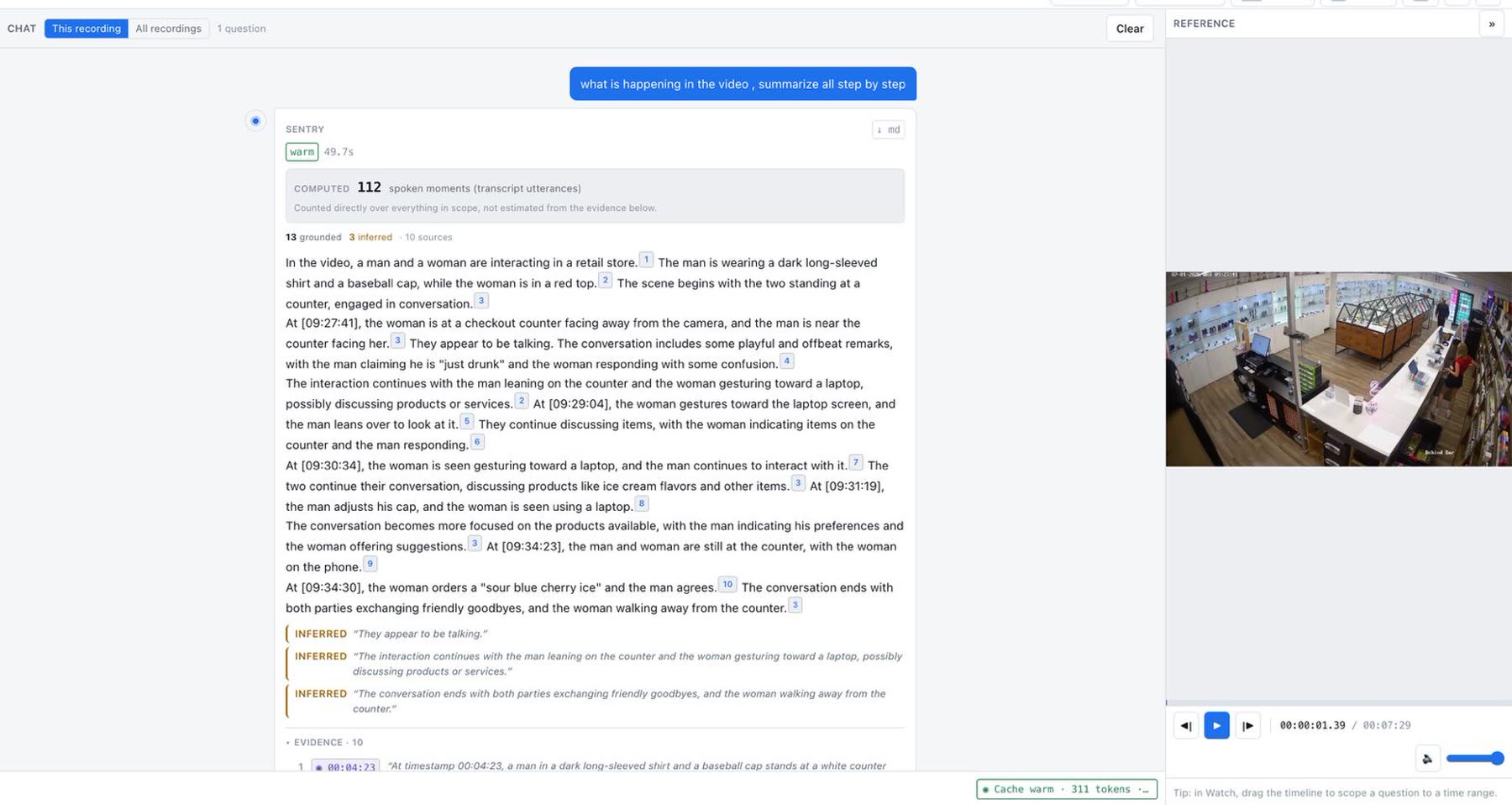
Ask. Read the answer. Check the evidence.
Every sentence carries a numbered citation, and every citation opens the second of video it came from. Anything the model inferred rather than saw is labelled as inferred, so you always know which is which.
- ✓112 spoken moments counted directly — not estimated
- ✓13 grounded · 3 inferred · 10 sources, stated up front
- ✓Click a timecode to jump straight to the frame
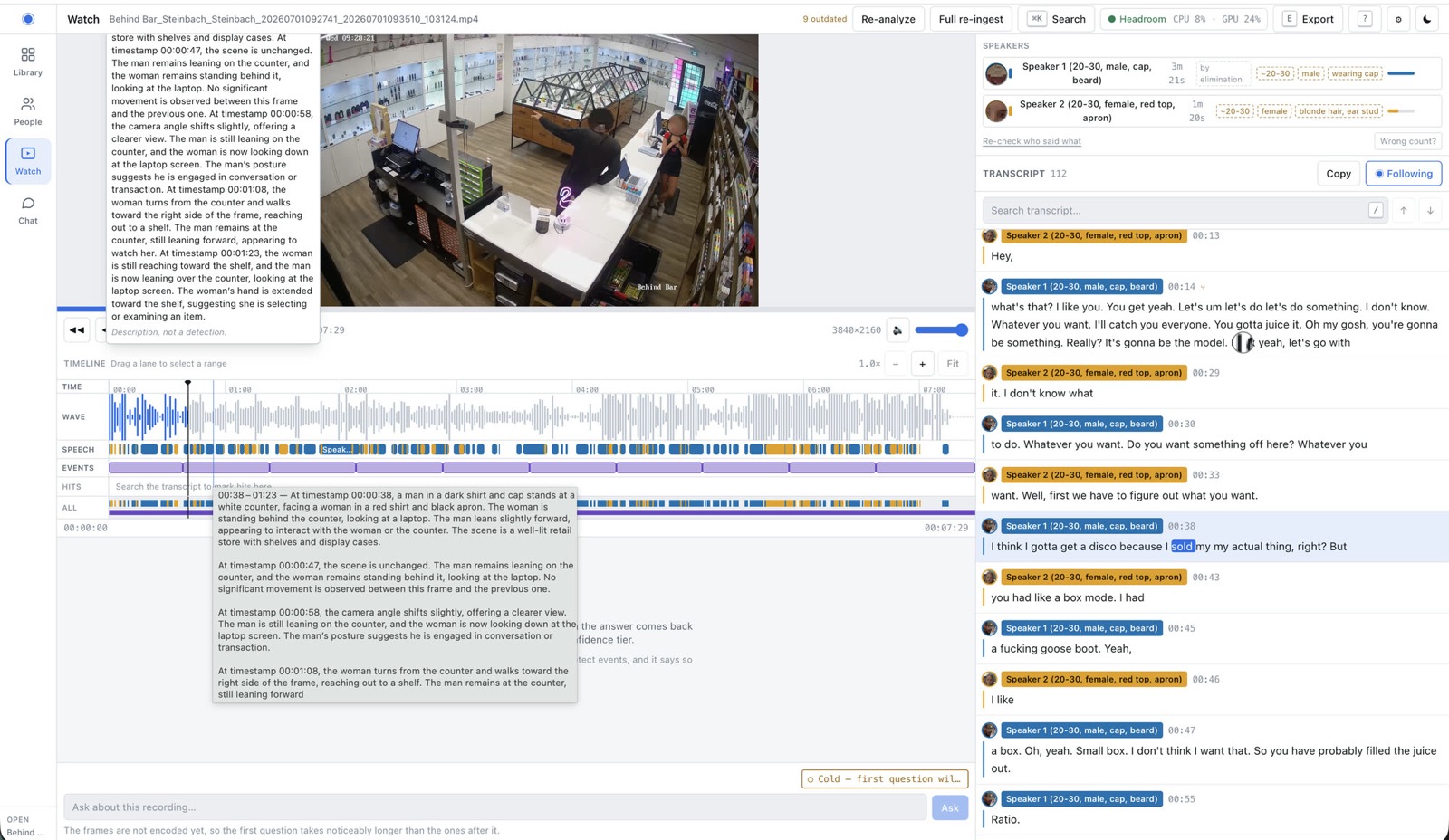
The whole recording, laid out on one timeline
Waveform, speech, detected events and search hits sit in their own lanes, so you can see where something happened before you watch it. Speakers are separated and described, and the transcript is searchable and follows playback.
- ✓Speaker separation with an attribute summary per person
- ✓Drag any lane to scope a question to a time range
- ✓Frame-level descriptions of what changed, and when
How it works
One computer, one graphics card, a day of video
It reads what you already record
A folder, your existing recorder, or a drive out of an old one. RTSP streams or files — almost anything works, and nothing gets replaced.
It writes down everything said, describes everything seen
Full transcription, speaker separation, faces and events indexed — every camera, every day, on your machine.
You ask, in a normal sentence
It searches the whole index, orders what it retrieved, and answers in seconds with clickable timecodes.
Or it emails you the day
Every morning, a write-up of everything that happened yesterday — email you can read with coffee.
One installer, no admin password, about two minutes. Your other sites just need somewhere for their cameras to save video — it reads from them over your own network.
Automations
Write the rule as a sentence. Let it watch instead.
There are no settings to configure — the rule is just what you typed. You get a message the moment it happens, with the clip, the time and what it saw.
“Alert me if someone stays in the stockroom more than ten minutes.”
One person for 90 seconds. It was the cleaner, so it closed itself instead of waking you.
“Let me know if a delivery turns up outside 7am to 11am.”
A van backed up to the bay nearly two hours early; two people unloaded fourteen crates.
“Notify me if anyone who isn't staff goes behind the counter after we close.”
Phone alert, with the clip, the time, and what it saw — the moment it happened.
Privacy
Nothing is uploaded. Nothing leaves the building.
No account, because there is nothing to log in to
No password, no API key, no company server, no metering.
Works with the internet unplugged
The installer fetches model weights once. After that, pull the cable — alerts included.
Retention is a hard drive you own
How long you keep video is a disk you bought, not a plan you rent.
Pricing
One payment. $1,200.
Paid once, per machine. Unlimited cameras on it, every feature, no expiry and no phone-home check. No subscription, no per-camera fee, no metering.
Owning it
$1,200 once
- ✓Unlimited cameras, every feature
- ✓No renewal, no metering, no per-question cost
- ✓Asking again costs you electricity
- ✓Runs on hardware you already own or buy once
A cloud subscription
per camera / month
- ✕Charges per camera, forever
- ✕Charges per question asked, per event, per alert
- ✕Charges per person who logs in
- ✕Your footage goes to somebody else's computer
Against a cloud service the whole difference is one arrow: at 20 cameras across three sites, owning it is ahead within the first year and never gets overtaken. The honest caveat — the machine, the disks and the licence come before it does anything, and a subscription starts at zero.
Hardware
It looks at your site, then sizes itself to suit it
Mac mini M4 · 24 GB
A single shop, or a home. Silent, and it fits behind a monitor.
24 GB unified LPDDR5X · 120 GB/s
Answers stream rather than appear.
RTX 5060 Ti build · 16 GB
DEFAULTThe value pick — the cheapest box of any kind that runs the full stack.
448 GB/s · 180 W · 32 GB DDR5-6000
The recommended default.
Radeon AI PRO R9700 · 32 GB
Multi-site retail. Ingest overnight, answer all day, in a cupboard.
645 GB/s · 300 W · 64 GB DDR5-6000
Twice the memory per dollar, same one-installer path.
RTX PRO 6000 Blackwell · 96 GB
A hundred-plus cameras, continuous ingest, one machine.
1792 GB/s ECC · 600 W
Every model resident at once, several ingests in parallel.
Extra sites need only a hard drive the main computer reads from. No second computer, no second licence.
Questions
The ones that matter
Does on-premise AI camera search send footage to the internet?+
No. There is nothing to sign up for, no account, no password and no company server involved. Listening, watching, searching and answering all happen on the computer in your building. It downloads what it needs once when you install it — after that you can unplug the internet and everything still works, including the alerts.
Will it work with my existing security cameras and NVR?+
Almost certainly. It reads the video your current system already saves rather than replacing anything, so you keep the cameras and the recorder you have. RTSP streams, a folder of exported clips, or a hard drive out of an old recorder all work just as well.
How much does AI video search cost?+
$1,200 once, per machine. Unlimited cameras on that machine, every feature, no renewal, no per-camera fee and no per-question metering. Asking a question again costs you electricity.
How many cameras can one machine handle?+
Over 100 cameras of continuous ingest on one workstation-class GPU machine. A single shop runs comfortably on a Mac mini M4 with 24 GB, and the recommended default build is an RTX 5060 Ti with 16 GB. Extra sites need only a drive the main machine can read.
Can it alert me automatically?+
Yes. You write the rule as a plain sentence — “alert me if anyone who isn't staff goes behind the counter after we close” — and it messages you the moment it happens, with the clip, the time and what it saw. There are no settings behind it; the rule is what you typed.
Does it recognise faces?+
Only people you have labelled yourself, from your own recordings. Nobody is named unless you name them, and no face data ever leaves the machine.
What does it not do?+
It does not replace your cameras or the cabling behind them, and it is not a managed service. Patching, a failed disk, a hot cupboard in August — it is a quiet appliance rather than a project, but it is yours to keep running.
Bring us a day of your footage
We will run it through a computer like the one you would buy, then sit with you while you ask it whatever you want. If the answers are not better than skipping through the video yourself, you have lost an afternoon and nothing else.
$1,200 once · unlimited cameras · no renewal